We built our own lifecycle app
Most people talk about the customer journey.
We built the tool that walks it.
Lifecycle Journey walks a public customer journey the way a real visitor would, records every step with screenshots and source evidence, and turns what it finds into one timeline, a list of named gaps, and a proposal with a test for each one, ready to hand to whoever owns the page.
Built and installed · Designed by Stephen Luc with an AI agent crew · Every claim on this page is tied to something the app actually observed · An audit that says "not observed" out loud
The problem it solves
Every company has a journey on paper: sign up, get started, buy, come back. What customers actually walk is different, and the difference is where signups stall, emails never land, and good products quietly lose people. You can't fix a journey you can't see. Lifecycle Journey makes the real one visible, with evidence.
What you get after one run
Not a tour of a tool. Three things you can use the same day:
A timeline
The public journey in order, one screenshot per step, each step linked to its source evidence.
A gap list
The steps you expected against the steps it found, with the unknowns kept visible instead of filled in.
A proposal per gap
Each gap comes with a suggested fix and a test for it, exported as Markdown or JSON you can paste into a ticket.
What it does
Seven working features, built around one idea: the journey, in order, with receipts.
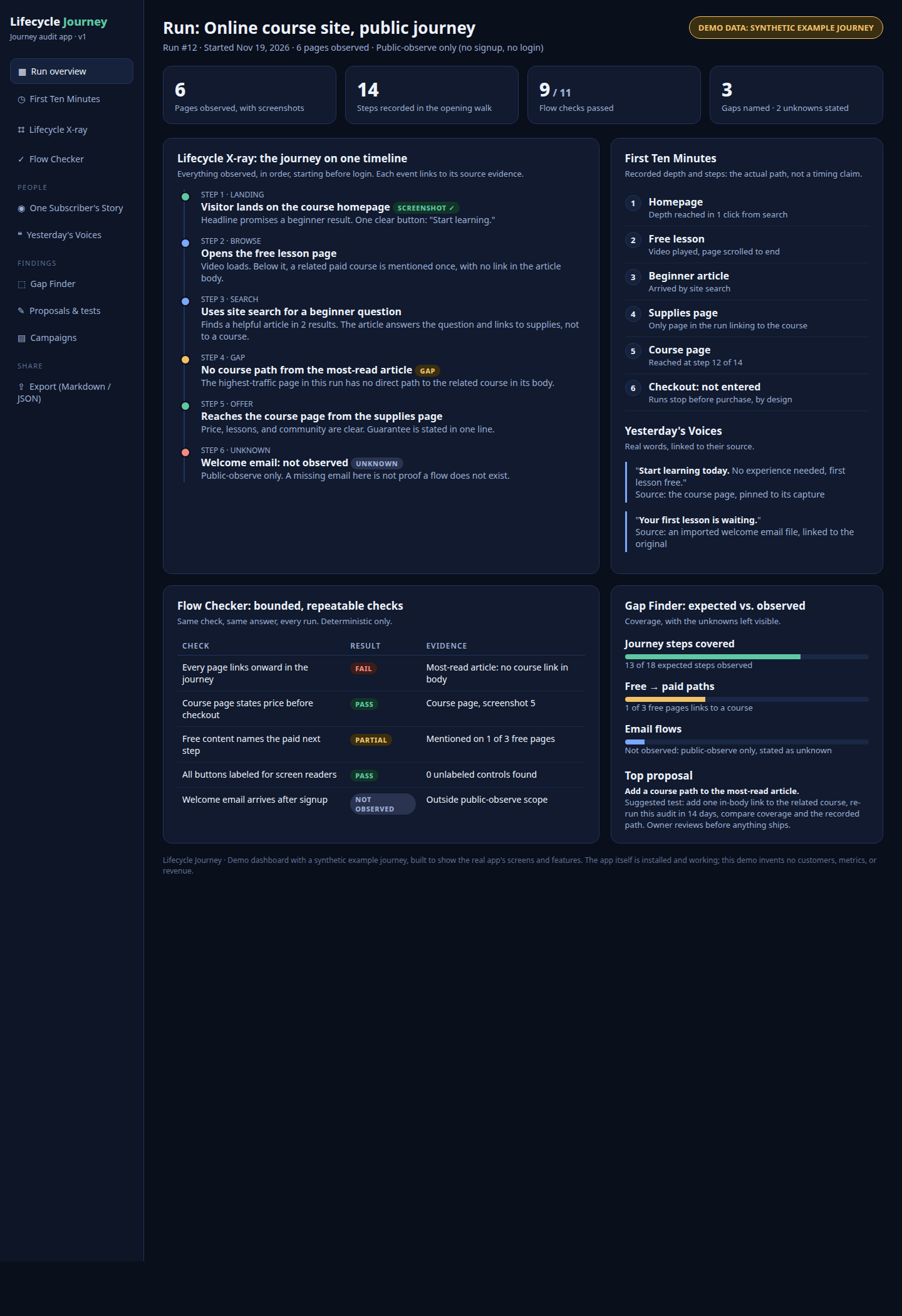
First Ten Minutes
How far a first visit gets, step by step, from a recorded walk of the public pages. Not a timer, and not a recording of real visitors.
Lifecycle X-ray
The whole journey on one timeline, starting before login. Every observed page and action, and any email you import, in order. Nothing scattered across five tools.
Flow Checker
Bounded, repeatable checks on a flow: link status, merge fields, accessible names, coverage against the expected steps. Same input, same answer. No vibes, no guessing.
One Subscriber's Story
Follow one walk at a time. Give each test visit a name and filter everything to it, instead of averages about everybody.
Yesterday's Voices
Every finding can carry an exact quote from the page or email it came from, pinned to the source so nobody paraphrases it later.
Gap Finder
Expected vs. observed, side by side. The steps a journey should have, against the steps that were actually seen, so gaps and unknowns get named, not hidden.
Before and After
Once a change ships, Campaigns compares observed browser sessions on that route before and after the date, from the site's own page counts. Paths keeps daily site-wide totals and shows how visits move between pages. Counts, not people. Reaching a page is not a purchase. It reports the comparison; it does not claim the change caused it.
The dashboard
This is the app's dashboard, shown with a labeled synthetic example journey. The real app is installed and working, and its screens look like this.
How it works
Four steps, all evidence-first.
1. Run
You give it a start page and a goal, with limits on pages and actions. The run creates a project you can watch, stop, and share. A browser agent then walks the public journey within those limits, and saves every step and screenshot as it goes.
2. Record
Observations are stored as source evidence that can't be quietly edited later. Humans and agents read the same record through a shared API, and through an MCP adapter, so an AI agent can run it as a tool.
3. Review
Findings are written against the evidence, checks run, and coverage is compared: what was expected, what was seen, what is still unknown.
4. Report
Each finding comes with a proposal and a suggested test. You choose what to share, and export it as Markdown or JSON. Campaigns can be measured in aggregate, with a change log of what was fixed.
What it honestly doesn't do
- It observes the public journey only. It does not sign up, log in, enter credentials, or sit in an inbox for days.
- A missing email in the record is not proof a flow doesn't exist. It means it wasn't observed, and the report says exactly that.
- An agent hitting an obstacle is not proof customers leave, and it is never dressed up as lost revenue.
That honesty is the feature. An audit you can trust beats a prettier one you can't.
On the roadmap
Two ideas are designed and deliberately not built yet. They're listed here as roadmap, not as features.
Reverse Funnel Builder
Start from the outcome you want, and work backwards to the journey that would have to exist to produce it.
Journey Flight Simulator
Test a proposed change against the recorded journey before you ship it to real customers.
Who built it
Stephen Luc has run lifecycle systems for twenty years and runs the marketing systems behind Watercolor Misfit. He built this to audit his own site first. It was built with his AI agent crew, reviewed independently, and installed as a working local app.
If you're going to offer lifecycle audits, you should be able to point at your own instrument and say: we built this, it runs, here's what it found.
Want your journey walked?
Stephen offers a free lifecycle audit and plan, in exchange for a case study. Send a public URL and the one thing you want visitors to reach. You get the timeline, the gaps and the plan back, and we write up the case study together.
Get in touch